

This approach ensures that editors can quickly adapt to the system without needing extensive training or technical expertise. The desktop is entirely web-based, so there is no need to install additional software -editors can access cmsWorks from any device using a modern browser like Mozilla Firefox or Google Chrome.
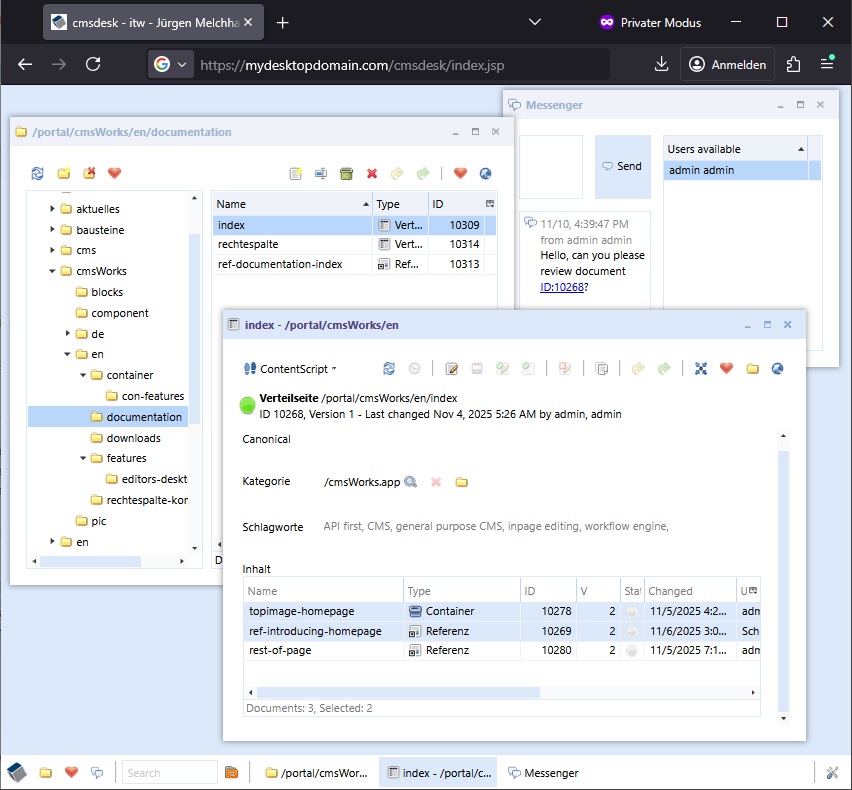
The windowed editors desktop showing a cmsExplorer, a messenger and a document window
That by also allowing for seamless remote work and collaboration across different locations. The interface supports drag-and-drop functionality, making it easy to organize and manage content. Cut and paste is possible between cmsWorks documents or external web pages and even office suits while the styles (i.e. headlines or tables) are being adopted, too.
Tools and customization
Handy tools are integrated to streamline editorial workflows, such as quick access to frequently used functions and shortcuts for common tasks.
A Workbook showing information about i.e. the last changes, publications, self set favourites comes in handy supports the editors work by providing interesting and helpful information.
The desktop is also highly customizable, allowing editors to personalize their workspace to suit their preferences and working style. This combination of ease of use, flexibility, and customization makes the cmsWorks editors desktop a powerful tool for content creation and management, ensuring that editors can focus on their work rather than struggling with complex software.