
Related topics by keyword
input field
2.3.2Date
The input of a timestamp is supported with the following actions.
 | Now | Use the current time | |
 | Pick | Choose a date and time | |
 | Clear | Delete the field input |
Actions on the date field
The date input field stores the values year, month, day, hour and minute. There is no configuration to only store the date or only store the time or to raise the resolution up to milliseconds.

Input field date
The action Now fills the input field with the current timestamp.
The action Choose opens the dialog to choose the date and time from a calendar view.
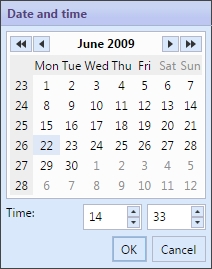
Dialog to choose a date and time
The date input field may be filled manually as well. Just take care on the date format.
If the input is not valid, the document cannot be stored and the field with the input error is marked.

If the input of the date input field is not correctly formatted