
2.3.7Grid
The input field grid organizes the input informations in a table form. In a grid table cell the input can be a text or a document reference.
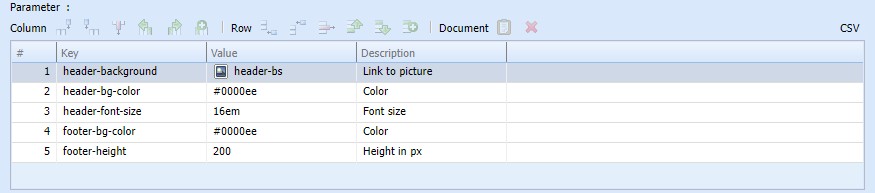
Input field grid for table like input
The toolbar buttons above the grid table show all actions that affect a cell, a row or a column:
 | Insert column right | ||
 | Insert column left | ||
 | Delete column | ||
 | Move column left | ||
 | Move column right | ||
 | Insert row below | ||
 | Alt+Plus | Insert row above | |
 | Alt+Minus | Delete row | |
 | Ctrl+Up, Alt+Up | Move row up | |
 | Ctrl+Down, Alt+Down | Move row down | |
 | Alt+Shift+Plus | Duplcate row | |
 | Alt+Shift+V, Ctrl+Shift+V | Insert document | |
 | Del | Delete document |
Possible actions on the grid input field
A double click on a cell starts the editor for text input. With the keys Enter, Tab, Shift+Tab the editor switches to another cell.
If a cell is filled with a document reference, this cell can not be edited with the text editor any more. The context menu on this cell shows actions to open the referenced document or to open a cmsExplorer focusing the document.
The column captions may be renamed by a double click.

Editing grid table column header
Using the button "CSV" opens a dialog with a CSV-Presentation of the grid content. Carefully edit this text keeping an eye on the format. This editing tool allows a more powerful handling of the grid data. Multiple lines can easily be copied, moved or deleted or even handled with external text editors doing replacements or sorts.
If the result of the editing is not the expected one, the editing state can be canceled to fall back to the previous version of the document.