
Home
ContactImprint
Users guideAdministrators guideProgrammers Guide
Users guide
1Login and Settings
1.1Login and Desktop
1.2Change password
1.3Settings
2Folder, documents and content
2.1cmsExplorer
2.2Document window
2.3Document input fields
2.3.1Richtext
2.3.2Date
2.3.3Documentlist
2.3.4Medium
2.3.5Picture editing
2.3.6Category
2.3.7Grid
2.4Internal links
2.5Publication
3Tools[+]
3.1Document search
3.2Picture search
3.3Workbook
3.4Research windows
3.5Messenger
3.6Update-Manager
4Administration
4.1Document types
4.2User administration
4.3User groups
5Tipps and Tricks
5.1Often asked questions
5.2Cheat sheet: cmsExplorer
5.3Cheat sheet: Desktop

3.5Messenger

« previous chapternext chapter »

The Messenger allows to exchange messages with other users, that are currently logged in.
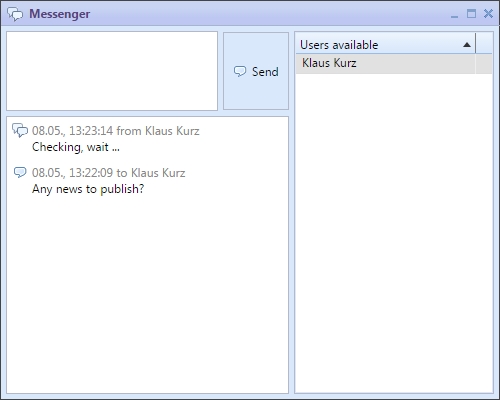
Messenger

Messenger

The Messenger can be activated in the cmsWorks main menu or directly from the taskbar on the cmsWorks Desktop. Before sending a new message one or more recipients have to be chosen.

« previous chapternext chapter »
Copyright © 2022 itechWorks, powered by cmsWorks 8.0